
# State Proof Feature
The data on the Miyabi blockchain is built as a result of the transactions which update the World State. The blockchain provides guarantee about the immutability and security of the data. If anyone takes the Miyabi blocks from the beginning and executes all the block transactions one by one, then they should be able to reach the same state, with the same set of data in the World State. The block header contains "state hash", which essentially is the root of the hash tree which is built using the World State data. Any change in the World State data will change the hash tree root and hence the block header's "state hash" value. So, this way, after execution of each block, the unique state hash signifies the updated World State's imprint. Any mal execution will result in different data and, consequently, a different state hash.
# What's a Hash Tree?
Hash trees are briefly described for the purpose of better understanding of this feature.
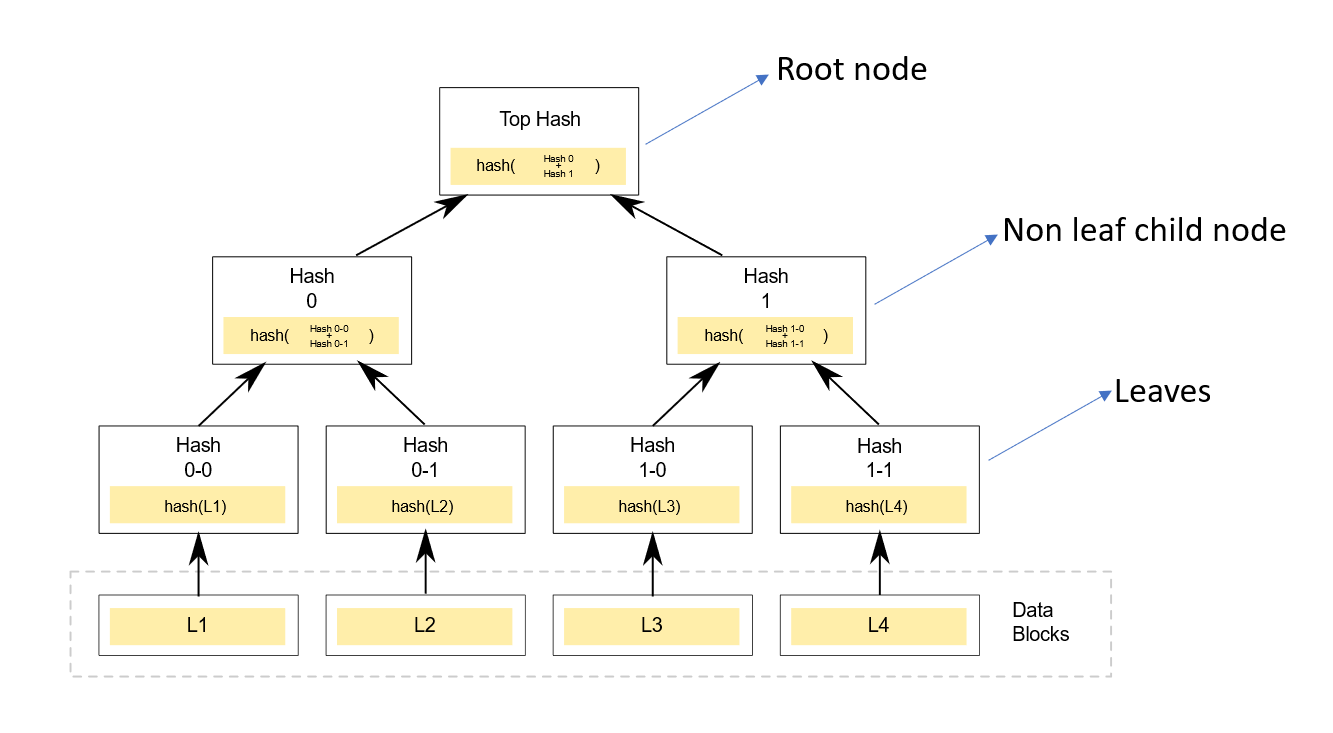 |
|---|
| Figure 1: Hash Tree |
L1, L2, L3 and L4 represent the actual data. The hash of the actual data is stored in the leaf nodes of the hash tree. As shown in the figure, the hash of the leaf node data is used to construct the next layer of the tree, which in turn is used to build the subsequent layer, and so on, until the root node of the hash tree is formed.
The top hash stored at the root node of the hash tree acts like a fingerprint of the data which is present in the leaf nodes. Any change in the leaf node's data, affects the sub-tree of the hash tree and changes the top root hash.
# What's a State Proof?
The state proof signifies the existence (or by corollary the non-existence) of data in the World State.
# State Proof Use Case
The World State data is stored in the form of Miyabi tables. We can define the use case for state proofs in Miyabi as follows:
Given
A state-proof S for the existence of a data D in a table T of the World State
When
I want to verify the existence of data D in table T and the correctness of the overall World State data
Then
I should be able to independently verify:
- The root of the World State's Hash tree using
S - The root of
T's Hash tree usingS
The state-proof consists of two types of "proof-of-existence":
- Proof of existence of a table data entry in the table
- Proof of existence of a table in the World State
Each of these proof-of-existence, corresponds to different hash trees maitained within Miyabi.
# Visualizing Proof-of-existence
The proof-of-existence of data, essentially means, the proof of the existence of a leaf node in the given hash tree.
# What are the components of a proof-of-existence?
In figure 2 below, let's consider that existence of L1 needs to be proved in a Hash tree. If the actual data, L1, L2, L3 and L4 is known, it is easy to perform hash operations and construct the Hash tree. But, when providing the proof-of-existence of data L1, no information about L2, L3 etc. can be revealed. The proof-of-existence for L1 has following requirements:
- L1 is known data, for which the proof-of-existence is required
- Other actual data can't be revealed
- The top root hash should be calculate-able using the information in the proof-of-existence
- The top root hash must be part of the proof-of-existence for verification purpose
Essentially, the proof-of-existence needs to contain the minimum possible hash tree components such that the top root hash calculation is possible.
For proving the existence of L1, we need:
- The data L1: So as to calculate
hash(L1), i.e., the data of the leaf Node 0-0 - Node 0-1's data: It is the neighbor node of Node 0-0. It doesn't reveal L2 and stores L2's hash. It is required neighbor of Node 0-0 so as to calculate next layer's Node 0.
- Direction of Node 0-1 : Since Node 0-0 and Node 0-1's data needs to be combined and hashed to calculate next level's node data, the order matters. Whether the Node 0-1 exists on the right side or the left side.
- Node 1's data: It's a non-leaf node. It is a neighbor of Node 0. Node 0 is a calculated node. Node 0's data and Node 1's data can be combined to calculate next layer's Node data (in this case it is top root hash).
- Direction of Node 1 : Since Node 0 and Node 1's data needs to be combined and hashed to calculate next level's node data, the order matters. Whether the Node 1 exists on the right side or the left side.
- Value of top hash: This is required for verification. It represents the value of the root node, which should match the value calculated using the leaf node values and neighboring node values.
 |
|---|
| Figure 2: L1's Proof of existence components |
# How to Enable State Proof Feature
By default, the state proof feature is enabled for the internal system tables. The user-defined tables can either opt-in or opt-out to use the state proof feature. For the tables which opt-in, it is possible to get a cryptographically verifiable proof-of-existence of the table data.
Miyabi users can create user-defined tables by submitting relevant transactions to blockchain. All the create table transactions will add a new table to the World State, as well as the metadata (or the table level configuration) about the table will be stored in the World State. This metadata, also called as the table descriptors, has the configuration about "supporting the state proof feature". In the create table transaction, the user can set this to opt-in for the state proof feature. Once set, this setting is permanent and can't be changed for the table.
# Miyabi State Hash Trees
The hash trees in Miyabi exist at two levels:
- Table level hash trees
- World State root hash tree
Both are explained briefly in the next sub-sections. The hash trees in Miyabi are "complete binary trees". Any create, update or delete operation to the data, results in the change of the leaf node layer of the hash tree. The hash tree in Miyabi is self-balancing, so as to maintain the property of "complete binary tree". The data in the leaf nodes is in a sorted order of the data entries.
# Table Level Hash Tree
The table level hash tree has:
- Table's data entries as the leaf nodes
- Top hash representing the fingerprint of all the data in the table
 |
|---|
| Figure 3: Miyabi table level hash tree |
# World State Root Hash Tree
The World State level hash tree has:
- Table hash trees' top hash as the leaf nodes
- By default, internal system tables contribute to the leaf node layer
- User-defined tables which have the state-proof feature enabled, also contribute to leaf node layer
- Top hash representing the fingerprint of all the data in all the tables
The Block header stores the root of this World State root hash tree.
 |
|---|
| Figure 4: Miyabi World State level hash tree |
# State Proof User Operations
There are two type of basic operations that a Miyabi user needs:
- Getting the state proof
- Verifying the state proof
Let's look at these operations.
# Getting the State Proof
A user can get the state proof using:
- API calls to the Miyabi nodes
- SDK methods which invoke the get state proof API
Getting the state proof is an online operation. The state proof is prepared by a Miyabi node and sent back to the user.
Each module in Miyabi supports different data type. Thus, each module, offers its own version of the get state proof API. Please refer to the module API reference for detail about the module specific get state proof APIs. The module specific APIs are the recommended way to get the state proof.
Additionally, there is a module agnostic general API also which can be used to get the state proof. This API is mostly meant to be used when the user is aware about the structure of database level raw keys and values of the table data. Mostly, this API is useful for getting the state proof for internal system tables. User-defined table's users can ignore this API endpoint and just use the module specific API endpoints, as they abstract-out internal structure of database key-values and provide user friendly input parameters.
# Verifying the State Proof
Verifying the state proof involves multiple steps. It requires a combination of SDK based offline operations and Miyabi node online API calls. A lighter verification can involve only partial checks instead of full verification.
Given a state proof S at height h, verifying the state proof involves the following:
1. var a := `S.ProofRootHash`  (Existing state proof's root)

2. var b := Calling method `S.ComputeRootHashFromEntry` (Computed root hash using the existing state proof and other inputs)

3. The above computation of `b` - without any error - verifies that `a` is a mathematically correct state proof for the given inputs.

4. var c := At the given height `h`, get the block header and retrieve the state hash from it.

5. Verify `a==b==c`.
The signature of the method mentioned in step 2 above is as follows:
public ByteString ComputeRootHashFromEntry(
	ByteString tableId,
	ByteString entryKey,
	ByteString entryValueHash)
The full state proof verification may become complicated or resource expensive for some user requirements, and so, the partial verification of the state proof may be considered in these cases. It involves verifying either
`a==b` // Offline users may prefer this
or,
`a==c` // Online users may prefer this
However, full verification is the recommended way.
# State Proof Operations Example
The recommended way to use the state proof feature is to automate both the operations of getting and verifying the state proof by using the Miyabi SDK. An example application, which demonstrates the state proof feature for all the modules can be found here (opens new window).
However, for the sake of scholarly interests, manual user operations based explanation is provided below.
# Create Table and Table Data
Create asset table with state proof feature enabled.
./miyabi-cli sendtransaction createassettable -t "MyAssetTable" -o 026beca06739461a20249fd4b24cf27542013624d18710bc418e8de10d6ef68568 -p 10425b7e6ebf5e0d5918717f77ce8a66aaf92bc64b65996f885ff12bd94ef529 --proofsGenerate asset token for an address
./miyabi-cli sendtransaction generateasset -p 6591bfae609236291e2d22609aeb1ce74550dcbbc628f91b6eef3c6f350a79da -t "MyAssetTable" -a 032fc2558d4df2e251a79be12926abf9f5fa0932311d6e19a63fb0ab46c39e35be -m 100Check table and table data existence
Get API call:
curl -X 'GET' 'https://localhost:9010/Asset/table/MyAssetTable' \
-H 'accept: application/json'
Response:
{
"value": {
    "00": -100,
    "032fc2558d4df2e251a79be12926abf9f5fa0932311d6e19a63fb0ab46c39e35be": 100
},
"atHeight": 39
}
# Get the State Proof
Get the state proof for the given table data
Get API call:
curl -X 'GET' \
'https://localhost:9010/Asset/stateproof/MyAssetTable/032fc2558d4df2e251a79be12926abf9f5fa0932311d6e19a63fb0ab46c39e35be' \
-H 'accept: application/json'
Response:
{
    "value": {
        "tableProof": {
        "paths": [
            {
            "key": "f0adafb6ebda4b4edf23144ea1ce5466c164959ec75873ea5c3aeea552ae55e9",
            "valueHash": "53add127cc4c217f9d9e8effb2a1aaf06ceb1e81",
            "steps": [
                1,
                1,
                1
            ]
            }
        ],
        "neighbours": [
            "aeb4a5c32aa49e461d13f3db40c42634ee40351b",
            "fb9ed7e0ece5d6164619840f12f62d36b25d2157",
            "776d7777411212f155356a810a7f39f1464b70f6"
        ]
        },
        "tableEntryProof": {
        "paths": [
            {
            "key": "032fc2558d4df2e251a79be12926abf9f5fa0932311d6e19a63fb0ab46c39e35be",
            "valueHash": "a737a9087cad75a274455c37e5383054c48026c8",
            "steps": [
                1
            ]
            }
        ],
        "neighbours": [
            "96ce5dc45ab504c45b28b89a80ec04eb81ab9e9b"
        ]
        },
        "proofRootHash": "197cba027224f83b3cf685b90eca88f4aeabdaac"
    },
    "atHeight": 30
}
The response of this API call is the state proof for existence of address
032fc2558d4df2e251a79be12926abf9f5fa0932311d6e19a63fb0ab46c39e35bein the table with nameMyAssetTable.stateProof = apiResponse.value atHeight = apiResponse.atHeight
# Verify the State Proof
Manually verifying the state proof is a cumbersome task, and it should better be done programmatically. But, just for sake of showcasing, we will do it manually.
The Miyabi Sdk provides various helper methods to do the verification. For manually verifying the state proof, we will at least need the following operations at our disposition:
Hash(data): Take the table data and calculate its hashHash(data1, data2): Take data1 and data2, combine them, and take the hash.GetTableId(tableName): Get the table id from the table name
Hash(data1, data2) is not the same as Hash(data2, data1), means, that the order matters when applying this operation.
This method is used to combine the two neighbouring nodes in a hash tree to calculate the data for the next layer's node. When combining neighbour node data, the data1 is left node's data and the data2 is the right node's data.
The hashing algorithm that we will need is RIPEMD160.
We will assume, we have these methods available to use, because the purpose is to illustrate how the state proof verification works and not get into nitty-gritties of these operations.
In our example, the Miyabi Sdk equivalents for these operations will be:
| Operation | Miyabi Sdk method |
|---|---|
| Hash(data) | AssetModelUtils.GetValueHash(value) |
| Hash(data1, data2) | ProofOperations.HashUtil(left, right) |
| GetTableId(tableName) | ModelUtils.GetTableId(tableName) |
Let's first focus on the table level hash tree in the state proof that we got above.
    "tableEntryProof": {
        "paths": [
            {
            "key": "032fc2558d4df2e251a79be12926abf9f5fa0932311d6e19a63fb0ab46c39e35be",
            "valueHash": "a737a9087cad75a274455c37e5383054c48026c8",
            "steps": [
                1
            ]
            }
        ],
        "neighbours": [
            "96ce5dc45ab504c45b28b89a80ec04eb81ab9e9b"
        ]
    }
Here, the key is 032fc2558d4df2e251a79be12926abf9f5fa0932311d6e19a63fb0ab46c39e35be, which is the same as we requested in the get API call.
The table entry's value's hash can be manually calculated and verified by doing:
entryValueHash = Hash(100) = a737a9087cad75a274455c37e5383054c48026c8
which gives us a737a9087cad75a274455c37e5383054c48026c8 and is the same as tableEntryProof.paths[0].valueHash in the response object.
Please refer to figure 2 for a mental model of the hash tree and the proof of existence. Using the hash of the actual data we can infer the data of the current leaf node. We will need its neighbor's data and combine it to get to the next layer's node data. The neighbor can exist on either the left or the right side of the current value node. The direction is specified by the tableEntryProof.paths[0].step member.
Step has two values:
0: It means neighbor is on the right1: It means neighbor is on the left
Since, there is only one step to reach the top root hash, we will need to combine the data node and neighbor node in one operation to reach the top root hash.
We will use the Hash(data1, data2) operation. Since, the step value is 1, it means the neighbor node is on the left side and current node is on the right side.
The current node's data, however, is not simply the entry value hash, rather, it is a combination of the entry's value's hash and entry's key which is calculated using the formula: Hash(data1, data2).
Since, there is only a single step under tableEntryProof.paths[0].steps member, we will proceed as follows:
- Step 1
Calculate the current node data
rightNodeData = Hash(data1: entryValueHash, data2: entryKey)

              = Hash(a737a9087cad75a274455c37e5383054c48026c8, 032fc2558d4df2e251a79be12926abf9f5fa0932311d6e19a63fb0ab46c39e35be)

              = 43bc6c69d44c57184521c1ebc54315a7c7e474bf
Combine the current node(right node) and neighbor node(left node) to calculate the parent level node
leftNodeData = tableEntryProof.neighbours[0]
             = 96ce5dc45ab504c45b28b89a80ec04eb81ab9e9b

tableLevelTopRootHash = Hash(data1: leftNodeData, data2: rightNodeData)
                      = Hash(96ce5dc45ab504c45b28b89a80ec04eb81ab9e9b, 43bc6c69d44c57184521c1ebc54315a7c7e474bf)

                      = 53add127cc4c217f9d9e8effb2a1aaf06ceb1e81
Now, we have the table level hash tree's root tableLevelTopRootHash.
It will be a part of the data which forms the leaf node layer of the World State Hash tree (refer figure 4). Other Miyabi table's hash tree root hash will also form the leaf node layer of the World State hash tree.
In the get state proof API response, let's focus on the sub-item which has this information:
    "tableProof": {
            "paths": [
                {
                "key": "f0adafb6ebda4b4edf23144ea1ce5466c164959ec75873ea5c3aeea552ae55e9",
                "valueHash": "53add127cc4c217f9d9e8effb2a1aaf06ceb1e81",
                "steps": [
                    1,
                    1,
                    1
                ]
                }
            ],
            "neighbours": [
                "aeb4a5c32aa49e461d13f3db40c42634ee40351b",
                "fb9ed7e0ece5d6164619840f12f62d36b25d2157",
                "776d7777411212f155356a810a7f39f1464b70f6"
            ]
        }
We can verify that tableLevelTopRootHash, which we previously calculated, exists as tableProof.paths[0].valueHash.
The corresponding key is actually the table id of the asset table that we created.
tableId = GetTableId(tableName)
        = f0adafb6ebda4b4edf23144ea1ce5466c164959ec75873ea5c3aeea552ae55e9
It can be verified that the table id matches with the tableProof.paths[0].key.
Next, we will need to calculate the root hash of this World State hash tree.
There are total three steps, under the tableProof.paths[0].steps, that we will need to take to reach to the top root hash.
Let's perform these steps in the similar way, as was done for the tableEntryProof.
In all the steps, the step value is 1, meaning that the neighbor node is on the left side.
- Step 1
- Calculate the current node data
rightNodeData = Hash(data1: entryValueHash, data2: entryKey) = Hash(53add127cc4c217f9d9e8effb2a1aaf06ceb1e81, f0adafb6ebda4b4edf23144ea1ce5466c164959ec75873ea5c3aeea552ae55e9) = a7b92e2e28120c8234da264d21bdd462b1b89e05 - Combine the current node (right node) and neighbor node (left node) to calculate the parent level node
leftNodeData = tableEntryProof.neighbours[0]
             = aeb4a5c32aa49e461d13f3db40c42634ee40351b

step1ParentHash = Hash(data1: leftNodeData, data2: rightNodeData)
                = Hash(aeb4a5c32aa49e461d13f3db40c42634ee40351b, a7b92e2e28120c8234da264d21bdd462b1b89e05)

                = fe746af06b83be25770706d1aa09317a78cc44e5
- Calculate the current node data
- Step 2
- Combine the parent level node (right node) calculated in step 1 with the next neighbour node (left node)
rightNodeData = step1ParentHash = fe746af06b83be25770706d1aa09317a78cc44e5 leftNodeData = tableEntryProof.neighbours[1] = fb9ed7e0ece5d6164619840f12f62d36b25d2157 - By combining, calculate the next parent level node
step2ParentHash = Hash(data1: leftNodeData, data2: rightNodeData)
                = Hash(fb9ed7e0ece5d6164619840f12f62d36b25d2157, fe746af06b83be25770706d1aa09317a78cc44e5)

                = 3936f444d7861239e2bdfcf084bfbc0f19ab5887
- Combine the parent level node (right node) calculated in step 1 with the next neighbour node (left node)
- Step 3
- Combine the parent level node (right node) calculated in step 2 with the next neighbour node (left node)
rightNodeData = step2ParentHash = 3936f444d7861239e2bdfcf084bfbc0f19ab5887 leftNodeData = tableEntryProof.neighbours[2] = 776d7777411212f155356a810a7f39f1464b70f6 - By combining, calculate the next parent level node, i.e., the top root hash
worldStateTopRootHash = Hash(data1: leftNodeData, data2: rightNodeData)
                      = Hash(776d7777411212f155356a810a7f39f1464b70f6, 3936f444d7861239e2bdfcf084bfbc0f19ab5887)

                      = 197cba027224f83b3cf685b90eca88f4aeabdaac
- Combine the parent level node (right node) calculated in step 2 with the next neighbour node (left node)
After performing these steps, we finally calculated the top root hash of the World State hash tree.
If we review the section Verifying the state proof, then we just now calculated b.
a = S.proofRootHash = "197cba027224f83b3cf685b90eca88f4aeabdaac"
b = worldStateTopRootHash = "197cba027224f83b3cf685b90eca88f4aeabdaac"
So, clearly, a == b.
Next, we need to calculate c.
How do we do that?
To get the state hash at a height h, we first need the value of h.
h is the apiResponse.atHeight in this section
So, h = 30. Next, fetch the block header at height h -1 and get the state hash from the block header. Why h - 1 and not h? The API response's atHeight represents the current height for which the blockchain is working, meaning that, the actual committed blocks exist only till the previous height.
Get the block header at height h - 1
curl -X 'GET' \
  'https://localhost:9010/headers/height/29' \
  -H 'accept: application/json'
Response:
{
  "value": {
    "height": 29,
    "id": "d29320f5e0f3330a8b00b7c177897e6083118b16272b6abede386c30e20892ed",
    "header": {
      "previousBlock": "3b9723daa33410d9cd8b44fbc5dd23059dd497d68598b54cf56b7bd0e0ae6d2f",
      "transactionsMerkleRoot": "5df6e0e2761359d30a8275058e299fcc0381534545f55cf43e41983f5d4c9456",
      "eventsMerkleRoot": "5df6e0e2761359d30a8275058e299fcc0381534545f55cf43e41983f5d4c9456",
      "stateHash": "197cba027224f83b3cf685b90eca88f4aeabdaac",
      "eventFilter": "00000000000000000000000000000000000000000000000000000000000000000000000000000000000000000000000000000000000000000000000000000000000000000000000000000000000000000000000000000000000000000000000000000000000000000000000000000000000000000000000000000000000000000000000000000000000000000000000000000000000000000000000000000000000000000000000000000000000000000000000000000000000000000000000000000000000000000000000000000000000000000000000000000000000000000000000000000000000000000000000000000000000000000000000000000000",
      "timestamp": "2024-09-05T04:40:13.7080471Z"
    },
    "evidence": {
      "acceptStatement": {
        "height": 29,
        "round": 0,
        "proposalDigest": "d29320f5e0f3330a8b00b7c177897e6083118b16272b6abede386c30e20892ed"
      },
      "evidence": [
        "3045022100a5f5016a7e76d8cdfe10a755a0cc7134209f2ddeeb57a6e9be92f3aeb73f8d6102200940856f802a55a8f3a6994768732a48fcfec27e9a30b5530a99a01388fb1201",
        "304402200ceec13c7914ff7c36c70bedf4822bc75f542a9d1d483f85f86bd746f326bb7f02203c48ecfc0ec758750569c58f49b5b0c15433d80379e78f6ec6419f8d378e4f64"
      ]
    }
  },
  "atHeight": 3128
}
Here, the block header is apiResponse.value.header.
Hence,
c = apiResponse.value.header.stateHash
  = "197cba027224f83b3cf685b90eca88f4aeabdaac"
By comparing, we can clearly see:
a == b == c
Hence, the state proof verification result is affirmative.
Note: Manual verification of the state proof is not recommended as it requires cryptographic operations and understanding of the intricate internal logic. An end to end application example on how to do the get and verify state proof operations for all the Miyabi modules can be found here (opens new window).